You get an SMS or WhatsApp message saying your vehicle has an unpaid traffic challan, with a link or an app to “pay now” before it is too late.
In short
- Fake e-challan messages carry a link or an .apk app that can steal your card details, UPI details or OTPs.
- The Department of Telecommunications says traffic police do not send payment links by SMS, WhatsApp or email.
- Check any challan yourself by typing echallan.parivahan.gov.in or using the official mParivahan app.
- Never install an app that comes in a message.
- Lost money? Call 1930 at once.
Not sure about a message you got? Paste it into the free ScamRead checker for a second opinion. It pulls out the links and numbers in the message and points out common warning signs. Always confirm a challan on the official site too.
In this post
- What a fake challan message looks like
- How the scam works
- 6 red flags
- How to check if a challan is real
- Already tapped the link? What to do
What a fake challan message looks like
These messages copy the look of a real traffic notice. They use your city name, a vehicle number format and words like “court” or “licence suspension” to make you panic.
Example (fake)
“Dear vehicle owner, a challan of Rs 500 is pending on vehicle MH01XX0000. Pay within 24 hours to avoid court action. Download the e-Challan app: http://echallan-pay-now.example/RTO.apk”
The link does not end in gov.in, it pushes you to install an app, and it gives you a deadline. All three are warning signs.
How the scam works
The goal is not the Rs 500. The goal is your bank account.
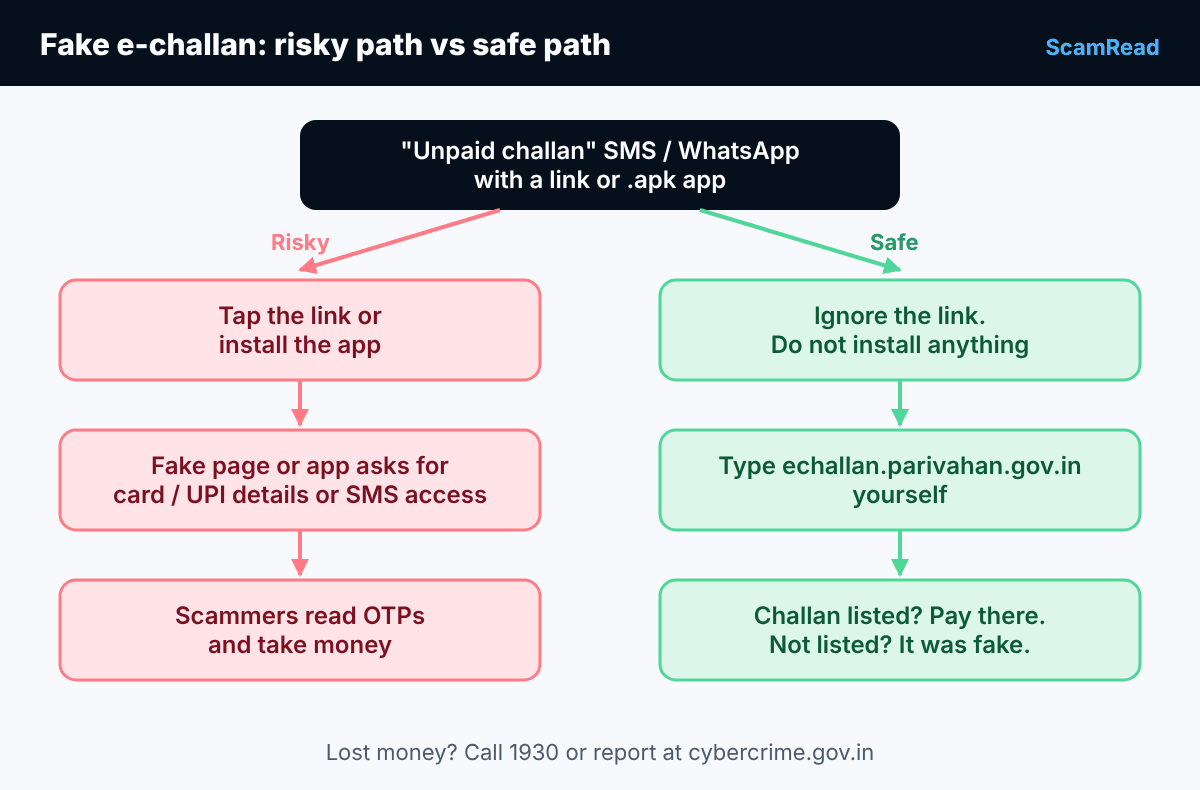
- Fake website: the link opens a page that looks like a government site. It asks for card or UPI details to “pay the fine”.
- Fake app (.apk): the message asks you to install an “RTO” or “e-Challan” app from outside the Play Store. Once installed, it may ask for permission to read your SMS. That lets it see the OTPs your bank sends.
- Money taken: with your details and OTPs, scammers make payments from your account.
In July 2026, the government’s PIB Fact Check unit warned that fake RTO e-challan links, apps and PDF files are being sent by SMS and WhatsApp, and that opening them can expose OTPs and lead to unauthorised bank or UPI transactions.
6 red flags
- A payment link sent by SMS, WhatsApp or email.
- An app or file to download, especially one ending in .apk.
- A web address that does not end in gov.in, or has a spelling twist like “e-chalan” or “parivaahan”.
- Pressure: “pay today”, “court case”, “licence will be suspended”.
- Spelling and grammar mistakes.
- The message comes from a private mobile number or an unknown WhatsApp account using an RTO logo.
How to check if a challan is real
You never need the link in the message. A real challan can be found on the official system.
- Open your browser and type echallan.parivahan.gov.in yourself. Do not search for it and tap the first ad.
- Choose Check Challan Status and enter the details it asks for.
- If a challan shows up, pay it only on that official site or in the official mParivahan app from the Play Store or App Store.
- If nothing shows up, the message was almost certainly fake. Delete it.
The official e-challan site itself warns that a fake website with a similar address and design has been collecting payments. So before you pay, look at the address bar and make sure it really ends in parivahan.gov.in. Our guide on how to check if a website is a scam shows a quick way to spot copycat sites.
Already tapped the link? What to do
Do not panic. Act quickly and in this order:
- Did not enter anything? Close the page and delete the message. You are most likely fine.
- Installed an app? Turn on airplane mode, then uninstall the app from your phone settings.
- Entered card, UPI or bank details? Call your bank’s official helpline to block your card or UPI. Change your UPI PIN and net banking password from a safe device.
- Money gone? Call 1930 or file a complaint at cybercrime.gov.in right away. The sooner you report, the better the chance of stopping the money.
- No money lost, but want to report the message? Use Chakshu on the government’s Sanchar Saathi portal (sancharsaathi.gov.in) to report suspected fraud calls and messages.
One more warning: after a loss, some people get calls offering to “recover” their money for a fee. That is another scam. Read about recovery scams so you can spot it.
Report it: If you lost money or shared bank details, call the national cyber crime helpline 1930 straight away, or file a complaint at cybercrime.gov.in.
Got another “pay your fine” message? Paste it into the free ScamRead checker to see the links and numbers inside it, then check the challan yourself on the official site.