Before you buy from an online store, enter your card details, or follow a link from a text message, check one thing: when was this website created?
A website that is decades old is not automatically safe. But a website created a few days or weeks ago, asking for your money or personal details, is one of the clearest warning signs of a scam.
The good news: checking a website’s age is free, takes about a minute, and never requires you to open the suspicious site. This guide shows you exactly how to do it, how to read the results, and what other checks to combine it with.
ScamRead Scam Checker
Got a suspicious link?
Paste it into ScamRead before you click. It checks links, texts and emails for common scam patterns, so you know what you’re dealing with in seconds.
Why scam websites are almost always new
Every website has a domain name (like amazon.com), and every domain has a public registration record showing the date it was created. Scammers cannot fake that date.
Scam sites are usually brand new for three reasons:
- They get caught fast. Once victims report a scam site, browsers and security companies block it. Scammers simply register a new domain and start again.
- They are cheap and disposable. A domain costs a few dollars. Criminals register them in bulk: 37% of phishing domains were bought through bulk registration services (Interisle, Phishing Landscape 2025).
- They are built for the moment. Fake holiday stores, fake toll-payment sites and fake package-delivery pages are created days before a campaign and abandoned soon after.
The numbers are striking. Palo Alto Networks’ Unit 42 found that more than 70% of newly registered domains were malicious, suspicious or not safe for work, about 10 times the rate among popular established sites. It also found that most malicious domains stay active for only a few hours or days (Unit 42). That is why a domain’s age is such a useful signal: a scam site has rarely been around long.
How to check if a website is a scam: look up when it was created
The most reliable free tool is run by ICANN, the non-profit that coordinates domain names worldwide. It uses RDAP, the official system that replaced the old “WHOIS” lookup for .com, .net, .shop and other generic domains on January 28, 2025 (ICANN).
- Copy only the domain name. From a link like
https://shop.best-deals-store.com/sale?id=123, you needbest-deals-store.com. Do not click the link to get it. Long-press or right-click and copy instead. - Go to lookup.icann.org in your browser.
- Paste the domain into the search box and press Lookup.
- Find the “Dates” section and look at Created. That is the day the domain was registered.
- Note the other details covered in the next section: registrar, expiry date and status codes.
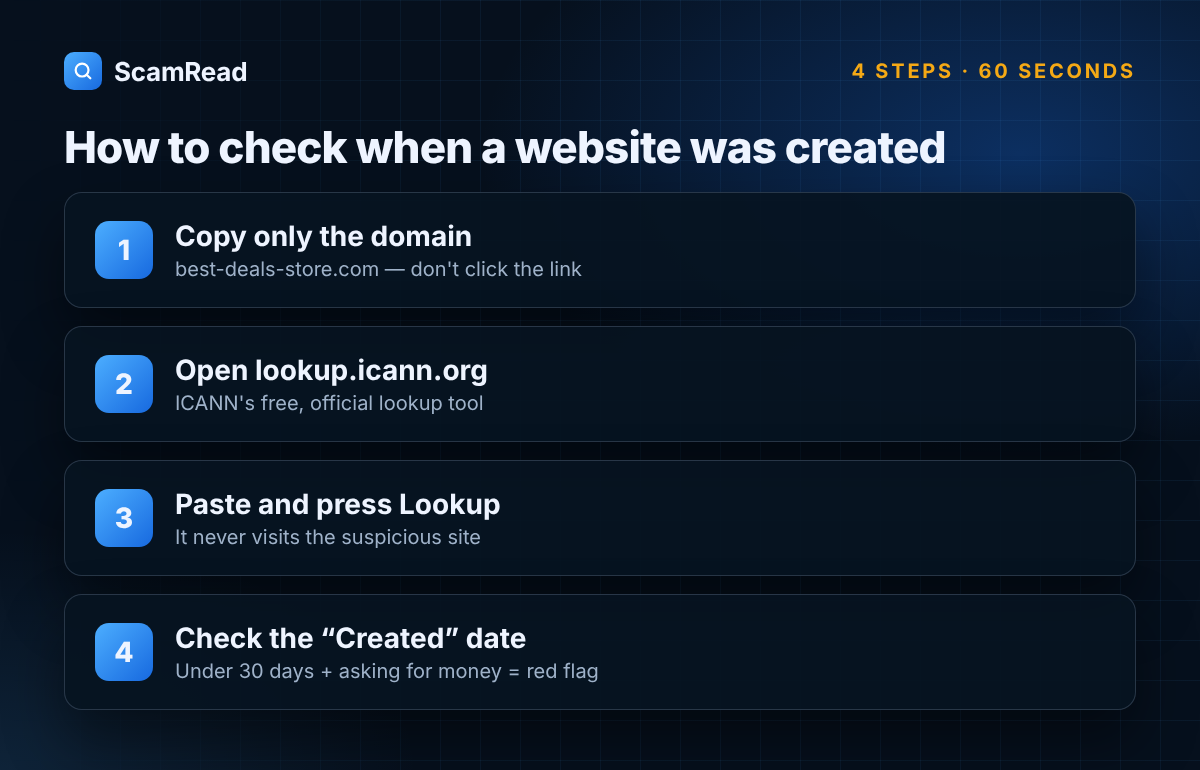
This lookup queries the official registry records. It does not visit the suspicious website, so it is completely safe.
Other ways to check:
- Paste the link into ScamRead. If the link came in a text, email or WhatsApp message, paste the whole message: ScamRead checks the wording as well as the link.
- Search Google for the domain name plus “scam” or “reviews”. No results at all for a store is itself a warning sign.
- The Wayback Machine (web.archive.org) shows snapshots of a site over time. A store claiming to be “serving customers since 2010” with no snapshots before last month is lying.
- Country domains (like .co.uk or .in) are run by national registries. If ICANN’s tool shows no result, search for that country’s official domain lookup.
How to read the results
The table compares the real registration record of paypal.com (looked up on October 3, 2026) with the pattern typically seen on scam sites.
| Field | paypal.com (real) | Typical scam site | What it tells you |
|---|---|---|---|
| Created | July 15, 1999 | Days or weeks ago | The single most important check |
| Expires | July 15, 2027 | About one year after creation | Scammers pay for the minimum period |
| Registrar | Markmonitor Inc. | Cheap, mass-market registrar | Big brands use specialist brand-protection registrars |
| Status | Six locks, including “server” locks | None, or only basic ones | Locks protect valuable domains from hijacking |
| Registrant | Name hidden, organization “PayPal Inc.” shown | Fully hidden or a privacy service | Hidden details are normal, so judge the other fields |
| DNSSEC | Signed | Usually unsigned | An extra security layer real companies often use |
What each field means, in plain English:
- Created: the day the domain was first registered. Under 30 days old and asking for payment? Treat it as a scam until proven otherwise. Under 6 months? Be very careful.
- Expires: when the current registration runs out. Established businesses often renew years ahead.
- Registrar: the company the domain was bought through. Big brands often use specialist registrars like Markmonitor or CSC.
- Status codes: codes like
clientTransferProhibitedare locks. Codes starting withserverare stronger locks set by the registry itself, usually only on valuable brand domains. - Registrant: who owns the domain. Since privacy rules changed, most personal details show as “REDACTED.” That alone is not suspicious.
The lookalike trap. Always check the exact domain. Scammers register names like paypal-account-review.com or amaz0n-support.com. The real company’s domain may be decades old, but the lookalike will be brand new.
ScamRead Scam Checker
Not sure about a website or message?
ScamRead looks for the warning signs that domain age alone can miss, like urgent payment demands, fake prize claims and suspicious links.
When domain age is not enough
Domain age is a strong signal, not proof. It is one part of how to check if a website is a scam, and it has limits:
- New does not always mean fake. Real small businesses launch new websites every day. A new domain is a reason to check more carefully, not an automatic verdict.
- Old domains can be hijacked or resold. Scammers sometimes buy expired domains with a long history, or hack a real old site and hide a scam page on it. If the creation date is old but the site’s content changed completely recently, the Wayback Machine will show it.
- Scams hosted on big platforms. A fake store on a social media marketplace, or a scam page on a free website builder, sits on a domain that is years old. Domain age tells you nothing in those cases.
Combine domain age with these checks:
- Payment method. A site that only accepts Zelle, wire transfers, crypto or gift cards is almost certainly a scam. Credit cards give you the right to dispute a charge.
- Prices too good to be true. 70–90% off brand-name goods is the classic fake-store bait.
- Contact details. No phone number, no physical address, or only a web form or Gmail address.
- Reviews off the site. Search the domain name with “scam” or “reviews” and read what people say elsewhere, not on the site itself.
- How you got there. A link in an unexpected text, email or social media ad deserves more suspicion than a site you found yourself.
For more warning signs, read That Website Looked Real. It Wasn’t. How Fake Sites Are Draining American Bank Accounts.
Frequently asked questions
How do I check if a website is a scam?
Start with its age: look up the domain at lookup.icann.org and check the “Created” date. Then check the payment methods, prices, contact details and outside reviews. A brand-new site that only takes Zelle, crypto or gift cards is almost certainly a scam.
How can I tell how old a website is?
Look up its domain name on ICANN’s free lookup tool at lookup.icann.org and check the “Created” date. It takes under a minute and does not require visiting the site.
Is a new website always a scam?
No. Many real businesses are new. But a site created in the last few weeks that asks for payment or personal information deserves extra checks before you trust it.
What is a safe domain age?
There is no magic number, but domains under 30 days old are the highest risk. Most scam domains are used within days of registration and abandoned soon after.
What is RDAP?
RDAP (Registration Data Access Protocol) is the official system for looking up who registered a domain and when. It replaced the older WHOIS system for generic domains like .com in January 2025.
Why is the owner’s name hidden?
Privacy rules mean most registrant details now show as “REDACTED.” This is normal for both real and fake sites, so focus on the creation date, registrar and status instead.
Check before you click
Got a suspicious link, text or email? Paste it into the free ScamRead scam checker before you click, pay or share anything. It works with texts, emails, WhatsApp messages, job offers and links.