You open WhatsApp and it says you’ve been logged out. Then a cousin calls asking why you need ₹10,000 urgently. Someone has taken over your account. Act quickly, step by step.
In short
- Warn family and friends right away through a call, SMS or another app: “Don’t send money to my WhatsApp.”
- Check your phone’s call forwarding setting and switch it off if it is on.
- Recover your account using WhatsApp’s official help page only.
- Report on cybercrime.gov.in. If anyone lost money, call 1930.
- Once you are back in, turn on two-step verification.
Got a message asking for a WhatsApp code or a call merge? Paste it into the free ScamRead checker before you reply. It pulls out the links, numbers and other details in the message and lists any warning signs it spots. A low score does not prove a message is safe, so trust the warning signs in this post too.
Check a messageIn this post
How these takeovers usually happen
India’s cyber crime coordination centre (I4C, Ministry of Home Affairs) has described the common tricks:
- The code trick: a caller gives a random reason and asks for the code you just got. That code is actually your WhatsApp registration code.
- The call-merge trick: the scammer starts registering WhatsApp on your number and asks you to “merge” calls. The merged call is WhatsApp’s verification call reading out your code.
- Once in, they may enter wrong codes on purpose so the account gets frozen for some time, which slows down your recovery.
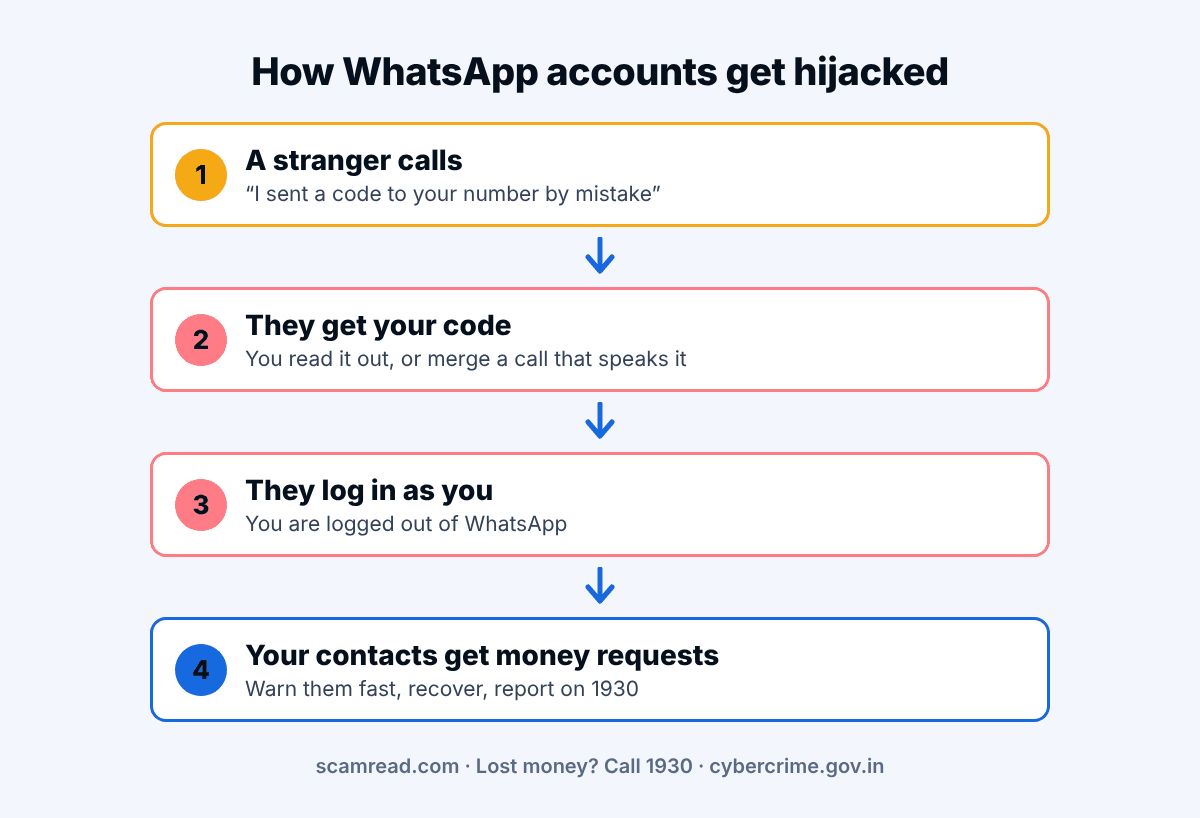
Example (fake names)
“Hi, this is Amit from the courier company. I sent a 6-digit code to your number by mistake for my delivery. Please read it back to me.”
Never share any code you didn’t ask for, with anyone.
What to do first
- Warn your contacts. The scammer will use your name to ask for money. Call or SMS close family and post a status on other apps: “My WhatsApp is hacked. Please ignore money requests.” I4C also advises contacting relatives and friends.
- Check call forwarding. Some scammers trick people into dialling a code like *401# followed by a number, which forwards your calls to them. The Department of Telecommunications says telecom companies never ask you to dial *401#, and advises checking your phone’s call forwarding settings and turning it off if it is on.
- Do not share any new code that arrives, even if someone calls claiming to be WhatsApp, your bank or the police.
Getting your account back
Open WhatsApp on your own phone with your own number and follow WhatsApp’s official guide: How to recover a compromised account. I4C also suggests contacting WhatsApp support.
- Only use links from WhatsApp’s own website or the app. Ignore anyone offering “recovery help” for a fee.
- If the account is frozen for a while, wait and try again. Don’t keep entering random codes.
Watch out
Fake “WhatsApp support” numbers and recovery pages exist. WhatsApp help is at faq.whatsapp.com.
Lock it down afterwards
- Turn on two-step verification in WhatsApp settings. I4C recommends this to secure the account.
- Limit who can see your profile photo. I4C advises this too.
- Check that your phone’s call forwarding is off.
- Remember the rule: a WhatsApp code is like a house key. Nobody genuine will ever need yours.
Report it
Report the hacking on cybercrime.gov.in. If you or anyone in your contacts sent money, call 1930 straight away. Faster reports give the best chance to stop the money.
Report it
Lost money or shared bank details? Call 1930 (national cyber crime helpline) as soon as you can, and report at cybercrime.gov.in.
Related reads: ‘Hi Mum’ messages from a new number · ‘Sorry, wrong number’ messages
Got a strange WhatsApp from a ‘friend’ asking for money? Check it before you pay. It pulls out the links, numbers and other details in the message and lists any warning signs it spots. A low score does not prove a message is safe, so trust the warning signs in this post too.
Open the free checker