Your UPI app keeps asking you to switch on UPI Lite for quick, PIN-free payments, and you’re wondering if that’s a good idea.
In short
- UPI Lite is a small balance inside your UPI app for small payments without a UPI PIN.
- Limits: up to ₹1,000 per payment and up to ₹5,000 in the Lite balance.
- You still need your UPI PIN to set it up and to add money.
- The main risk: anyone with your unlocked phone can spend the Lite balance. Keep it small and lock your phone.
Not sure about a message?
Got an SMS saying your “UPI Lite will be blocked”? Paste it into the free ScamRead checker – it looks for red flags such as PIN requests, KYC language and links. Check a message →
In this post
How UPI Lite works
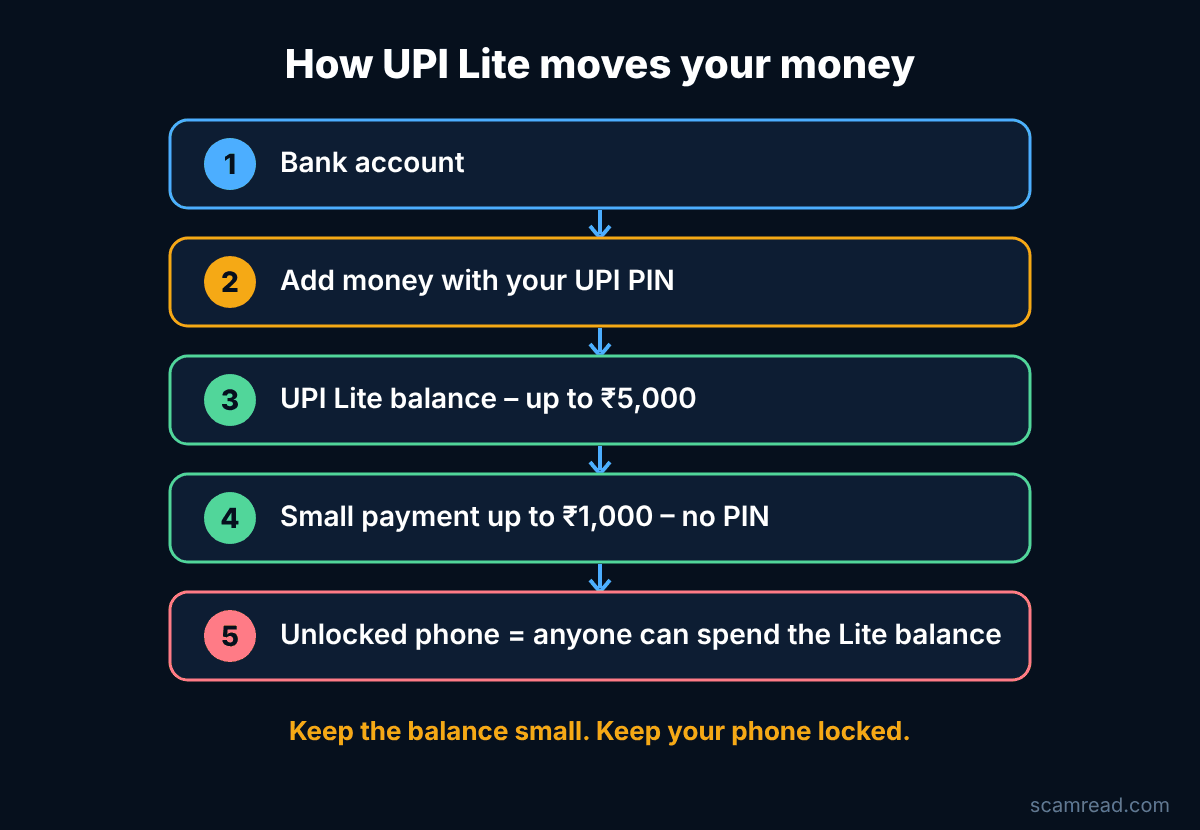
Think of UPI Lite as a small purse inside your UPI app. You move money into it from your bank account using your UPI PIN. Then you can pay small amounts – tea, auto, groceries – with a tap, without typing the PIN each time.
- Each Lite payment can be up to ₹1,000, and the balance can be up to ₹5,000 (the limits given in a government note from August 2026).
- You can top up by hand with your UPI PIN, or switch on auto top-up through UPI AutoPay if your app offers it.
- If you turn UPI Lite off in your app, the remaining balance goes back to your linked bank account.
- NPCI says UPI Lite does not work on jailbroken phones.
What’s safer, what’s riskier
Safer: you type your UPI PIN less often in shops and buses, so fewer people get a chance to watch you enter it. Lite payments come from the Lite balance, not straight from your bank account, so the money exposed is limited to what’s in it.
Riskier: no PIN means no last check. If someone grabs your unlocked phone, or a child plays with it, the Lite balance can be spent. Auto top-up can keep refilling it.
So, is UPI Lite safe? For small, everyday payments it can be – if you treat the balance like cash in your pocket and keep your phone locked.
7 ways to use UPI Lite safely
- Use a strong screen lock and turn on your UPI app’s own lock.
- Keep only a small amount in Lite – what you would carry as cash.
- Think twice before turning on auto top-up.
- Turn Lite off if you don’t use it – the balance returns to your bank.
- Changing phones? Turn off UPI Lite on the old phone first. NPCI says the balance does not move to a new device.
- Check your Lite payments in the app’s history now and then.
- Never type your UPI PIN on a website or link. Use it only inside your UPI app, to send money or add money.
Watch out for fake “UPI Lite” messages
Scammers use any new feature as bait. A common trick is a warning that your “UPI Lite wallet will be blocked” unless you click a link and enter your PIN.
Example (fake)
NPCI ALERT: Your UPI Lite wallet will be blocked today. Update KYC at http://upi-lite-kyc-update.example and enter your UPI PIN to keep your balance.
Do not click. Delete the message, and if you want to check anything, open your UPI app or your bank’s official app yourself.
Phone lost or stolen?
- Call your bank on its official number and ask them to block UPI on the lost phone.
- Block your SIM with your mobile operator and get a replacement.
- If money was taken, call 1930 or report on cybercrime.gov.in quickly.
- Secure your other apps too – see WhatsApp hacked? What to do first.
Related: UPI fraud refund process: RBI rules · How many SIM cards are in my name?
Report it
Lost money or spotted a fraud? Call 1930 (National Cyber Crime Helpline) or report at cybercrime.gov.in. Report quickly – the sooner you report, the better the chance of stopping the money.
Not sure about a message?
Next time a “UPI”, “KYC” or “wallet blocked” message arrives, run it through the free ScamRead checker before you tap anything. Open the checker →